ECS-00Early access
Sort the yard before anyone walks it.
Equipment Condition Scoring reads model era and surface condition from an annual flight over your yard or lot, then ranks every visible unit by how close it sits to the end of its economic life.
- GSD
- 5 cm or finer
- Cadence
- Annual
- Platform
- Drone / crewed aircraft
- Spectral
- RGB
How a fleet gets graded now
A consignment lands, or a lender hands over a repossessed portfolio spread across several yards, and the sale date is already on the calendar. Someone has to work out what each unit is before the reserve gets set. So an appraiser or a yard inspector goes out with a clipboard. Find the serial number plate, write down the meter hours if the cluster still works, take the walk-around photos, put a grade on the wear, and note the leaks and the dents.
The notes go back to the desk, where they get lined up against comparable sales and turned into an opening number.
That works on a small lot. It breaks on a fleet too big to walk unit by unit before the catalogue closes. The yard is mud in March, units sit nose to tail, and some lots get a quick look at best. The grades depend on who was out there that day, and the units nobody reached go into the catalogue on whatever the seller's paperwork says.
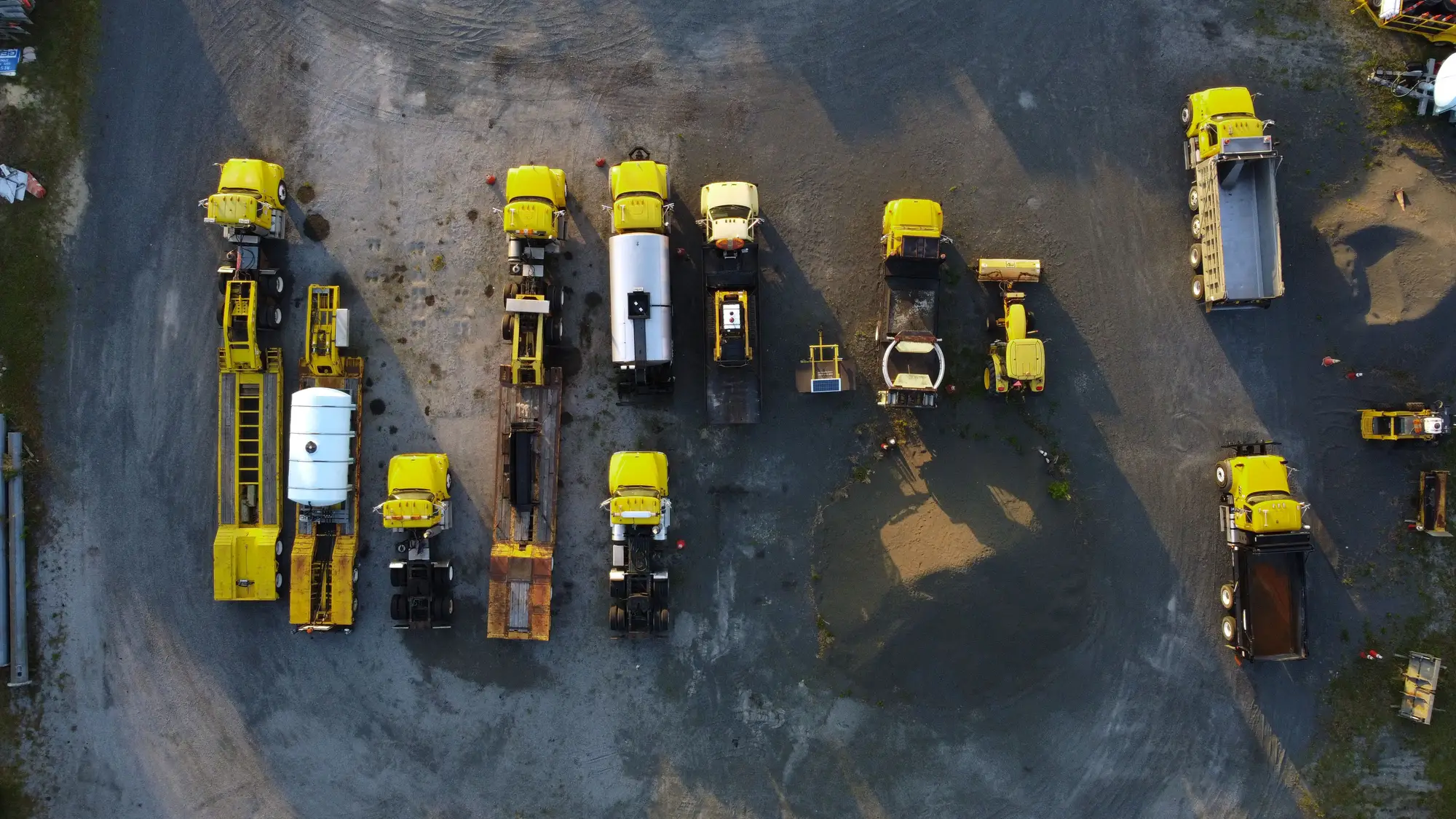
A flight does not replace the walk. It changes the order of it. Every unit the camera can see gets a model era, a condition grade and a place in a ranking, so the appraiser spends the hours where a call matters.
What comes back
One delivery per annual flight, per site. During early access, that covers the sites you choose to put forward.
- 2.1
Graded machine roster
Roster · one row per unit
Each visible unit gets a unit ID, a model-era estimate and a condition grade, on a scale printed at the top of the roster. The flight date is on the file, so nobody reads it as today's condition.
- 2.2
Ranked list
Rank · closest to end of economic life first
The same roster sorted so the units nearest the end of their economic life come first. Open it beside your lot list and start the walk-around at the top.
- 2.3
Per-site summary
Summary · one line per site
The fleet-average grade for each yard or lot, for a quick read before you open the units. Useful when a lender wants to know which yard to look at first.
- 2.4
Low-confidence flags
Flags · units the flight could not see well
Units under a shed, stacked, or hidden by their neighbours are listed with a reason. They go back on the walk-around list, ungraded, rather than given a grade on a guess.
How it works
- 01
Site or lot in
You send the yards, auction lots or portfolio sites to fly, with a boundary for each and any unit list you already keep.
- 02
Flight
A drone or crewed aircraft pass at 5 cm or finer, timed to your sale calendar. One pass per site per year.
- 03
Analysis
Each machine is classified by the model-generation cues and surface wear that show from above, and given a place in the ranking.
- 04
Delivery
A graded, ranked roster per site, with flags. Early-access customers go through the first roster with us.
Where it fits in your workflow
Before the reserve is set
Use the ranked list to decide where the appraiser goes first. The top of the list gets the full walk-around and the condition report. The middle gets a spot check. The flagged units get walked whatever else happens. The grade does not go into the condition report as an inspection finding, and the appraiser's own sign-off still sets the number.
A lender with a portfolio across several yards can read the per-site summary first to see which yard needs a visit.
Limits
- L-01
Resolution floor
At 5 cm a pixel is five centimetres across. A machine's outline, size class and configuration should show up. A badge, a decal or a small fitting does not. Model era is read from body shape and layout, so generations that look alike from above can be confused, and the grade is a relative read of surface wear, not of what is inside.
- L-02
What the flight cannot see
It sees the top and some of the sides. It cannot read meter hours, check fluids, hear an engine or find hydraulic leaks. Condition here means visible surface condition only.
- L-03
Sheds, stacks and shadow
A unit under a roof, stacked on another or hidden behind its neighbours may be missed or under-graded. Those units are flagged when we can tell they are there.
- L-04
Once a year
The roster reflects the flight date, not the day someone reads it. A unit that arrived or left since then is not on it. Cadence is a target and can slip with weather.
- L-05
A grade, not a price or an appraisal
There is no dollar value in the roster, and the grade is not a certified or insurance-grade appraisal. A qualified appraiser still signs.
Who it's for
For
- Equipment remarketers and auction teams valuing a consignment before the catalogue closes
- Lenders and leasing companies that remarket repossessed or off-lease units and need a read across many yards
- Appraisal teams with a fleet too large to walk unit by unit
Not for
- Teams that need a certified appraisal or a dollar valuation
- A mechanical inspection of one machine, including hours, engine or hydraulics
- Live tracking of where units are or what state they are in today
- A single unit a buyer wants checked before a purchase
Questions before early access
Q.01Is this a certified appraisal?
No. It is a condition proxy to help you decide where the appraiser spends time. The signed appraisal stays with a qualified appraiser.
Q.02How is the grade defined?
From visible surface wear and model-generation cues, on a relative scale printed on the roster. It is not an insurance or accounting standard.
Q.03Does it give a dollar value?
No. You get model era, condition grade and a rank. Price comes from your comps and your appraiser.
Q.04What if a unit is under a shed or stacked?
It may be missed or under-graded. Where we can tell it is there, it is flagged and goes back on your walk-around list.
Q.05How do we check it against our own inspections?
Pick a yard your team has already walked and keep the condition reports to yourselves. When the roster arrives, compare grades unit by unit and decide whether the ranking is good enough to sort a fleet by.
Q.06How current is the roster?
It reflects the date of the flight. Cadence is annual. There are no monthly updates.
Q.07Who owns the imagery and the roster?
Ownership and licence terms for both are written into the early-access agreement before anything is flown. Ask for them early if your counsel needs to read them.
Q.08How would it be bought and priced?
Early access is scoped per site and per fleet, and the price is quoted for that scope. Tell us your sale calendar and how you buy services.
Q.09Will it load into our auction or inventory system?
The roster comes as a file you can open in a spreadsheet or GIS and match to your unit IDs. We do not write into your system.
ECS-08Early access
Put your first fleet on the early-access list.
Tell us which yards you would fly and when the next sale closes. We will say whether the flight can be done in time.
Request early access